Scan
Enter your website address and confirm it's yours. SiteGuard checks it from the outside, the same way an attacker would look at it.
WEBSITE SECURITY FOR NON-EXPERTS
SiteGuard scans your site for the security problems attackers look for — then explains each one in plain English, with a step-by-step fix. No jargon, no account, no security degree required.
Most security tools hand you a wall of red warnings and leave you stuck. SiteGuard gives you a clear score from A to F, tells you what each problem means for your business, and walks you through fixing it — in the order that matters.
SEE IT IN ACTION
Type your address, click Scan, and SiteGuard checks your SSL certificate, security settings, exposed files and outdated software — about 30 seconds per site. Pro keeps all your sites on one dashboard and tracks their score over time.
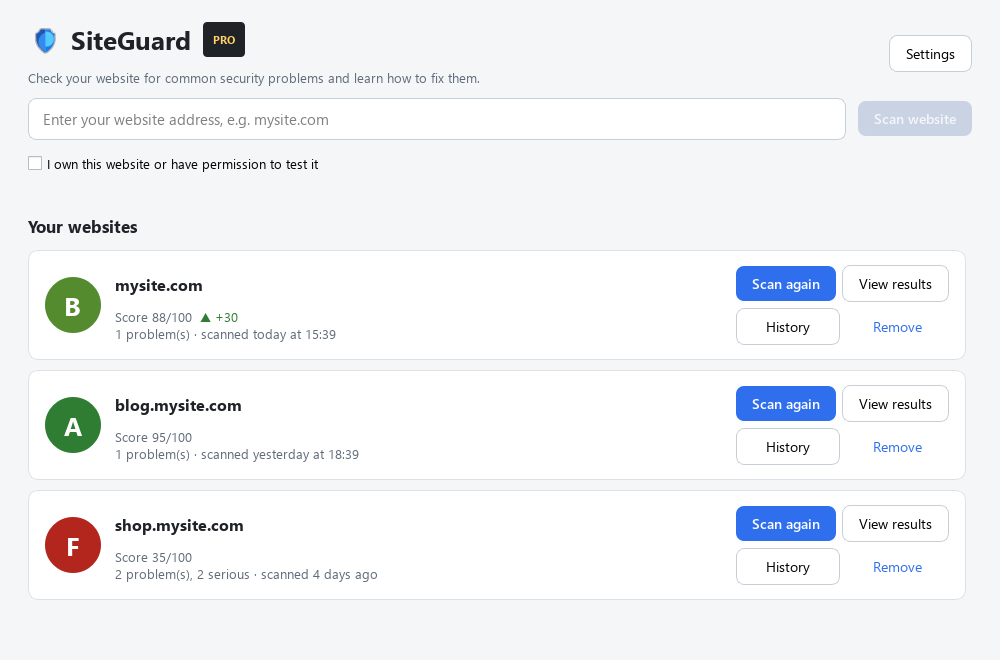
Enter your website address and confirm it's yours. SiteGuard checks it from the outside, the same way an attacker would look at it.
Every problem gets a severity, a plain-language explanation of what it means, and why it matters — no technical background needed.
Follow the step-by-step fix for each issue, starting with the most serious. Re-scan any time to watch your score climb.
WHAT SITEGUARD CHECKS
Confirms your site uses HTTPS, your certificate is trusted and not about to expire, and visitors are sent to the secure version.
Checks the security headers that stop clickjacking and cross-site attacks, flags leaked server versions, and finds insecure cookies.
Looks for files that should never be online — .env secrets, .git folders, database backups, phpMyAdmin and directory listings.
Detects old WordPress, Drupal, Joomla, jQuery and PHP versions with known security holes that attackers actively scan for.
The free version finds every problem and shows you how to fix it. Pro adds all your websites, scan history, and branded reports for you or your clients.
No account, no card. About 26 MB.
Pro is days away. Start with the free version — your scans carry over.
Already have a license key? Open SiteGuard, then Settings → SiteGuard Pro and paste your key. Works offline — no sign-in.
BEST VALUE · SECURITY SUITE
Get both Obsidian Orb security tools together and save. SiteGuard watches your website; Sentinel Board tests your API and Flutter mobile app. One checkout covers both.
Plus applicable tax. Then $79/year for SiteGuard Pro.
Sentinel Board is yours to keep.
QUESTIONS & ANSWERS
SiteGuard is a Windows desktop app that checks your website for common security problems. You type in your address, click Scan, and it tells you what's wrong in plain language and exactly how to fix it — covering your SSL certificate, security headers, exposed files and outdated software. It gives you a score from 0–100 and a grade from A to F.
Yes. The free version runs all four checks, shows every problem it finds, and gives you the full step-by-step fix for each one — for one website, forever, with no account and no card. Pro adds unlimited websites, scan history, and saved branded reports.
Pro ($79/year) keeps all your websites on one dashboard, remembers every past scan so you can see what changed since last time, and lets you save professional PDF or web reports with your own logo, colour and business name — ideal if you look after sites for clients. It also includes priority email support.
After checkout you'll get a license key by email. Open SiteGuard, go to Settings → SiteGuard Pro, paste the key and click Activate. That's it — the key is checked on your own computer, so there's nothing to sign in to.
No. SiteGuard runs entirely on your computer. Your scan results, saved reports and history stay on your machine — nothing is uploaded to us or anyone else.
Only scan websites you own or have permission to test. SiteGuard asks you to confirm this before scanning a new site. It checks your site from the outside the way a visitor's browser would, without trying to break in.
SiteGuard is currently a Windows 10 and 11 app. If you'd like a Mac version, email laura72008@gmail.com and let us know — demand helps us prioritise.
GIVE YOUR WEBSITE A CHECKUP